
In spite of the arrival of the digital age, most people still have to deal with at least some paperwork. This may be legal documentation, magazines, official files, invitations, paper for work, or other things. Admittedly, the trend is away from physical paperwork, meaning we need to get our digital lives in order. If you want to work on this, check out this “task a day digital declutter” series. Meanwhile, it still makes sense to have an effective system to manage persistent paper. Here are some steps to help you get those tenacious pieces of paper under control.
Capture Incoming Paper
First, establish a designated “hold” zone for all incoming paperwork. Remember, paper arrives from multiple sources. Mail is the obvious culprit, but paperwork also comes home in school backpacks, briefcases, purses, shopping bags, etc. The temptation is to drop it on the nearest surface when we walk in the door, such as on the kitchen counter or a table in the entry. If you time to process paper immediately, that’s ideal. However, most people are busy when they get home, making immediate processing unrealistic.
Rather than stash paper wherever it is convenient, consider designating one place, such as a bin, basket, or corner, where you will put paper until you can sort it. If you share space with others who tend to dump paper, consider giving them a spot as well. This is a temporary hold zone, not a final destination.
Sort Paper Into Action Files
To keep your hold zone from overflowing, schedule regular sorting sessions. A daily sort works well, but if this is unrealistic, commit to sorting at least once a week.
It’s important to note that sorting and processing are two different steps. Sorting simply moves paper from your hold zone into the appropriate action folder. Regular sorting gives you peace of mind because you know nothing important is slipping through the cracks.
Sorting should be a quick and relatively stress-free process:
1. Recycle or discard anything you don’t need. This includes catalogs, junk mail, credit card offers, unwanted charity solicitations, and advertising inserts tucked into bills. Keep only what you actually need.
2. Shred any paper containing sensitive personal information. It is helpful to have a shredder near your hold zone so that you can shred in real time. If you lack space for a shredder near your hold bin, set up a container (e.g. a small extra trash can) labeled “to shred” where you place sensitive materials. Shredding is a low-effort task you can do whenever you have a few spare minutes. If you don’t have a shredder, one possible alternative is to tear sensitive information into small pieces and put it into your kitchen trash, where moisture from other garbage will help to make it unreadable. While not as secure as shredding, this provides some protection if a shredder isn’t available.
3. Sort the remaining papers into action categories that fit your life. After trashing and recycling, the remaining paper will require some action on your part. I find it helpful to create folders for the most common types of action. For example:
- To Pay: Bills are the obvious items here, but this folder also includes anything requiring payment, such as school fees, membership renewals, donations, or event tickets. If it requires a payment of any kind, it belongs here. If you come across something that needs to be immediately paid, (e.g. a late bill, a field trip check due tomorrow), either pay it now or flag it with a post-it note and clip it to the front of the “To Pay” file to remind you to pay it as soon as possible. Once you’ve paid it, either discard the paperwork or move it to your filing system if you need to keep it.
- To Follow Up: Use this folder for paperwork that requires some type of action beyond payment. You may need to make a phone call or look up a piece of information. Examples include invitations that need an RSVP, forms that require signatures, or paperwork that prompts a phone call. As with the bills, once you have taken the needed action, the piece of paper can leave this folder, either into the trash or to be stored elsewhere. Something like an invitation can get hung on a bulletin board as a visual reminder, and the date (if you decide to attend) should be added to your calendar. [Pro tip: Add the event details directly to your calendar, including the time, location, and any notes you’ll need later.]
- To Read: This folder is for documents that require uninterrupted reading. An example might be a rental agreement for a vacation home, a contract, a report, a letter, etc. It’s perfect to grab before heading somewhere you’ll be waiting, such as a doctor’s office, school pickup line, or train ride.
- To File: Use this folder for papers you want to keep but don’t have time to file immediately. For instance, you might receive a contract or statement of account. This may also hold bills you have paid. This folder is handy because we often don’t have the time to file paper in the moment. A “To File” folder is a place to hold papers until you have time to properly put it all away. [Pro tip: Put a recurring reminder on your calendar to empty this folder each week.]
- Pending: Use this folder for paperwork tied to projects that are still in progress. Examples are paperwork for an item you are returning, an insurance claim that you are waiting to clear, and a supply you have ordered and are waiting for it to arrive. Review it at least once a month to make sure nothing stalls.
- Upcoming Events: If you have trips, vacations, or major family events coming up, consider keeping a folder for each one. This is a place to quickly put anything associated with that event or activity so it doesn’t get lost. After the event, recycle anything you no longer need and file any documents worth keeping.
Some people prefer to group their paper by when it needs to be processed, rather than by the type of action. This is the idea behind the traditional tickler file. If you want more information about how to set one up, check out this book by my friend and fellow organizer Julie Bestry.
Stage Action Files
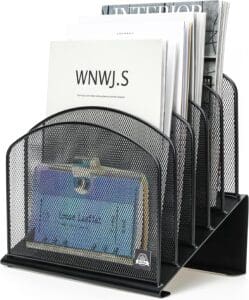
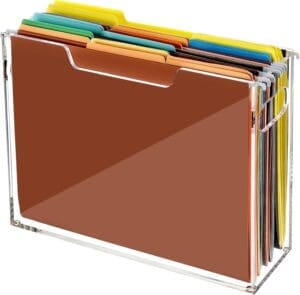
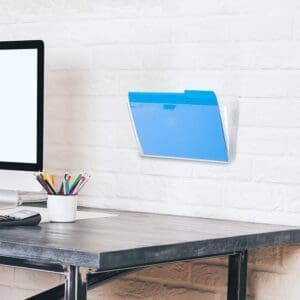
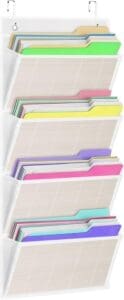
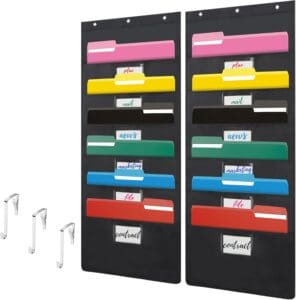
There are many options for how to store your action files. Common options include a desktop sorter, a hanging sorter, or a horizontal sorter. Keep your action folders close to wherever you sort your incoming paper so the system is easy to maintain. The one you choose largely depends on the space you have and your visual preference.
Here are a few ideas to inspire you.
Process Action Files
While the sorting step should be quick and easy, actually taking care of what is inside your action folders will take longer. The simplest way to stay on top of paperwork is to schedule dedicated processing time.
Some people find it works well to do a short spurt of work each day, such as 15-30 minutes. I call this “Daily Desk Time”—a brief period each day devoted to paperwork and other administrative tasks. The benefit is that paperwork never becomes an overwhelming project. You can set an alarm to keep you in your chair for a planned period of time, and then let yourself be finished for the day.
Another option is to work on a certain type of action on different days of the week, such as filing on Fridays or phone calls on Tuesdays. Having a slot in your schedule helps your mind get ready for what it knows is coming. This approach works for many types of tasks.
Store Inactive Files
As you process paperwork, you may end up with paper that you want to keep. Many people keep paper associated with the current year’s bills and activities and then cull them annually after tax season. Some paper should be kept to support your tax return, and there are some documents that should be kept indefinitely.
Anything that is very hard to replace, such as a will or legal document should be kept securely in something like a firesafe box. You can read more about what these are and how to set one up here.
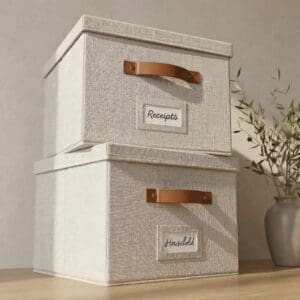
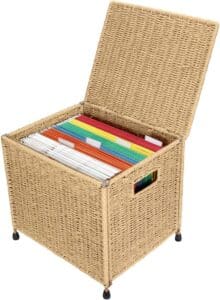
Paper that you want to be accessible, such as reference paperwork or paper related to the current year, can go into any number of filing containers. There is, of course, the standard filing cabinet. If that feels like too much, you might prefer something smaller or more decorative. Here are a few inspirations.
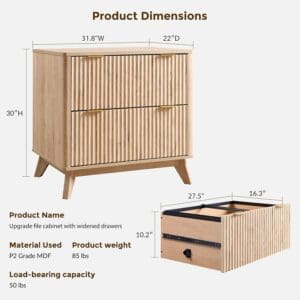
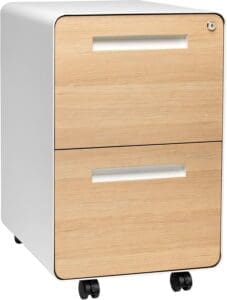
A good rule of thumb is this: the less often you need a document, the farther away you can store it. For example, paper you touch frequently should be near your desk or work station, while old tax returns can go in a banker’s box in an attic, basement, or remote closet.
* * *
While the trend is away from physical paper, you still may have some you need to address. By establishing a system through which paper flows, you can keep it from piling up and feeling overwhelming.
How much paper do you manage these days?


Pingback: A Better Desk | The Seana Method Organizing & Productivity
I an a big fan of well pockets. It frees up flat space and create a specific home for specific papers. Having a slot for these gives you the opportunity to batch your paperwork.
Some people really like having their files out and within easy reach, and the wall is perfect for that. I’ve also had clients who didn’t want to see them at all. Nothing out. We human beings all have our proclivities I guess. Either way, it helps to be organized, right?
It’s an interesting question: “How much paper do you manage these days?” While I can’t quantify it exactly, I’m generally managing much less paper than I used to. Part of that is because the kiddos are adults, and I no longer manage any paper-related tasks for them. However, there are other reasons I’m managing less paper. Fewer papers come in, and more of what used to be on paper is now digital.
While I’m managing less paper, I still have a lot of paper files. I have plenty of digital files, too. At least I’m no longer printing emails. If I want to keep those, I store them in the appropriate electronic folders.
Printing emails – I remember those days!
Paper is definitely on the decline. I have observed that the paper issue is somewhat generational. The younger generations have very little, while the older generations still have a lot.
Having a system for both paper and digital “files” is important, right? Hopefully they have a similar mental pattern so you can find what you need with little effort.
We are working our way down on paper. My goal is to have as little as possible left for my kids to deal with!
I am still using paper for creative thinking and planning, but this process is becoming increasingly digital as I get more comfortable with it. However, the important documents are still physical. I totally agree that keeping these important documents in a fireproof safe is very important.
In 2024, I invested in a FastFoto Epson scanner that quickly scans photos and papers/receipts. It has been a lifesaver for me. Great for when I have to travel with these documents.
Thanks for sharing your thoughts, Seana.
Scanning is a great way to make the transition from paper to digital. I get there’s a post to be written on how to use these well. What do you think, Sabrina?
I am a believer in action files – but I always tell my clients two things when we set them up.
#1 putting the paper in the action file is not the action – it needs a scheduled follow up
#2 anything you put in the to do folder needs a date on your calendar before you drop it in
Amen! What gets scheduled gets done!
I definitely don’t have as much paper coming in as I used to, but there’s something about a tangible piece of paper that says “keep me.” I find that treating paper the way I treat emails will help me decide whether I need to keep it or not.
I’ve also transitioned to digital for many tasks, but I still prefer paper. It’s easier to see, to sort, and to manage in my opinion. But, this isn’t the way of the world, so I carry on.
Meanwhile, turns out many clients still have tons of paper, so knowing how to treat it is still valuable!
Sadly, I don’t do much deleting of email or even texts! Heading over to the digital declutter series now…
Hope you find it helpful! Delete away!!
I use to have a great little filing system but your blog reminded me that I haven’t look at it for a few years. Time to go through it and get rid of the old and file a lot of the newer things that have just been growing in a pile.
It’s always nice to have a reminder and the suggestion to schedule some time to take care of it.
I reminded myself to go through my pending folder as I wrote this LOL!
You’re speaking my language, Seana! Paper Doll approves!
As I was reading along regarding your action files, I was nodding my head, thinking, “THIS is exactly the way to do it if you prefer action categories to a tickler file” and was expecting you to probably mention them. I was NOT expecting you to reference and link to my classic little ebook on tickler files, and I really appreciate you doing so. Both approaches are valid, and which one works best likely depends on how a person thinks and how complex their schedule is.
I love all the different action file staging options you offer; whether they’re desktop or wall-based, I only have one rule for this kind of tool: they must not squeak! 😉 And that wicker file crate on wheels is FABULOUS!
I love the idea of desk time, but given that mine is usually around 1 a.m., I’m more inclined to assign the action categories to particular days (Monday Marketing, Wednesday for problem solving, and either Tuesdays or Fridays for financial tasks).
My pleasure, Julie. A great tool is worth re-sharing!
I have so many clients who seem “afraid” to put files into a file drawer where they think they will lose them. I’m happy to see so many options for wall-mounted storage. Personally, I prefer to tuck them away and pull them out as needed, but I have learned that we are all different. It’s about finding out what works best for each individual. The key elements are the same, but the “niceties” can be customized!
I am pretty good at this. I have a lot of file space and I’m pretty organized. What I don’t do well is sort through my files regularly. It’s easy to put things in a file and forget them. Regular sorting the contents is important. I’m trying to get better!
Sounds like you are doing quite well, Dianne! Cheering you on from here!